

standardcode and mididentifier at checkout. Your SKU is already sent separately, so there is no new SKU field to add. Do not use the US MID fields for EU PID.
For what each identifier is, see The three identifiers on the overview page.
What you need to do
-
Create the Global-e attribute type. In Centra, go to System, then Configuration, click Create attribute type
and add

ge_variant_data(Global-E Variant Information) using the definition below. -
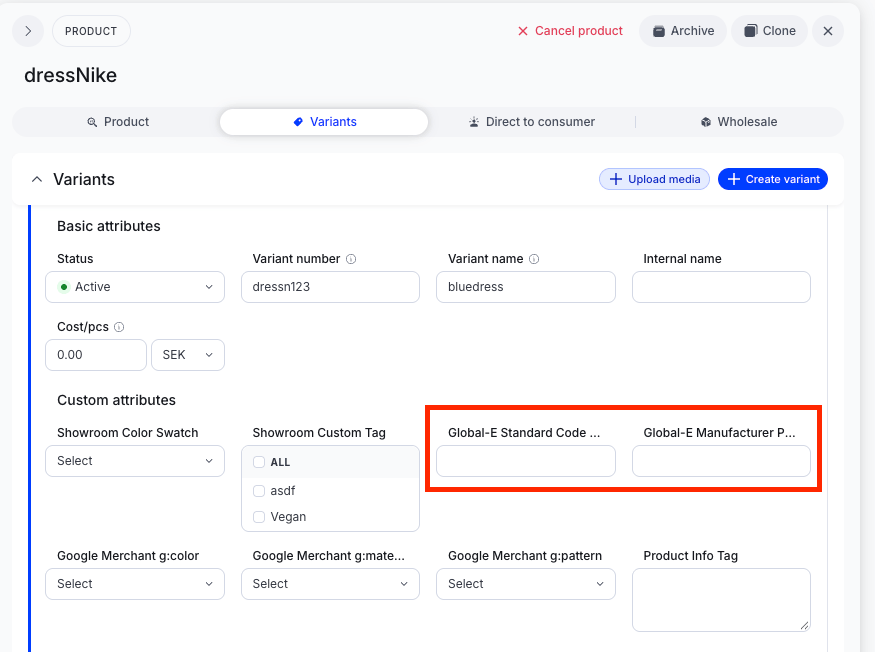
Populate the values per variant. Open the product, go to the Variants tab and click on the variant name, then Custom attributes. On each variant, fill Global-E Standard Code and/or Global-E Manufacturer Product Code when you have values to send.
-
DTC merchants only: go to Platform, then Stores management, then Stores,
open your store, then Plugins, then DTC API, then View.
 Under Display item attributes, search
global-e variantand select both Global-E Standard Code and Global-E Manufacturer Product Codethen click Save. Checkout API merchants skip this step.
- Place a test order and confirm the values appear when populated and are omitted when blank.
Key points One pair of values per variant. Populate each variant that can appear in the cart. A value on the parent product alone is not enough when the variant has no value of its own.
In Centra you see Global-E Standard Code and Global-E Manufacturer Product Code under Custom attributes. The integration maps them to
standardcode and mididentifier (lowercase) at checkout.
The catalog setup is the same for DTC (GraphQL) and Checkout API. DTC has one extra step: select both attributes under store, DTC API, Display item attributes, then Save.Omit, don’t fake. When a variant has no value, leave it blank. Never enter an empty placeholder such as NA, 0 or -.
When values are read: at checkout. Updated variant values apply on that SKU’s next checkout.
Quick check before go-live