

Introduction
Global‑e’s Shipping API provides merchants with fully integrated shipping capabilities to get the relevant shipping labels and documentation to ship straight from their warehouses or through a 3PL. For this purpose, the integration is based on implementing the Global‑e shipping solution akin to a simplified carrier integration. This API works seamlessly across Global-e direct integrations and Managed Markets merchants. This document describes the implementation of the API calls required to perform the necessary shipping activities.Shipping Model Scenarios
To fulfil a cross-border order, use the Global-e APIs to generate shipping documents, including labels and commercial invoices. This ensures accurate and compliant documentation for the shipment, enabling a duty guarantee. Global‑e supports the following document and document formats:- Shipping labels in 6x4 format, available in PDF/ZPL/EPL for specific UK carriers.
- Commercial Invoices in 8.5x11 inch letter size or A4 format, provided only when a carrier and country do not support Paperless Trading (PLT).
Integration Overview
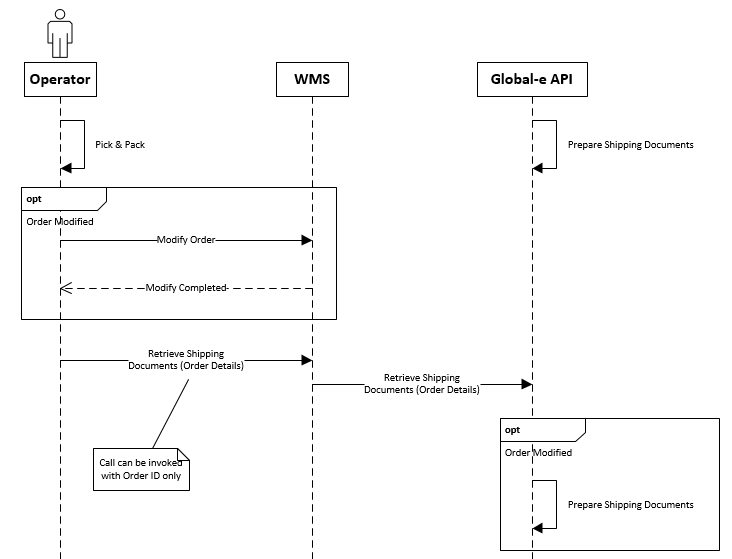
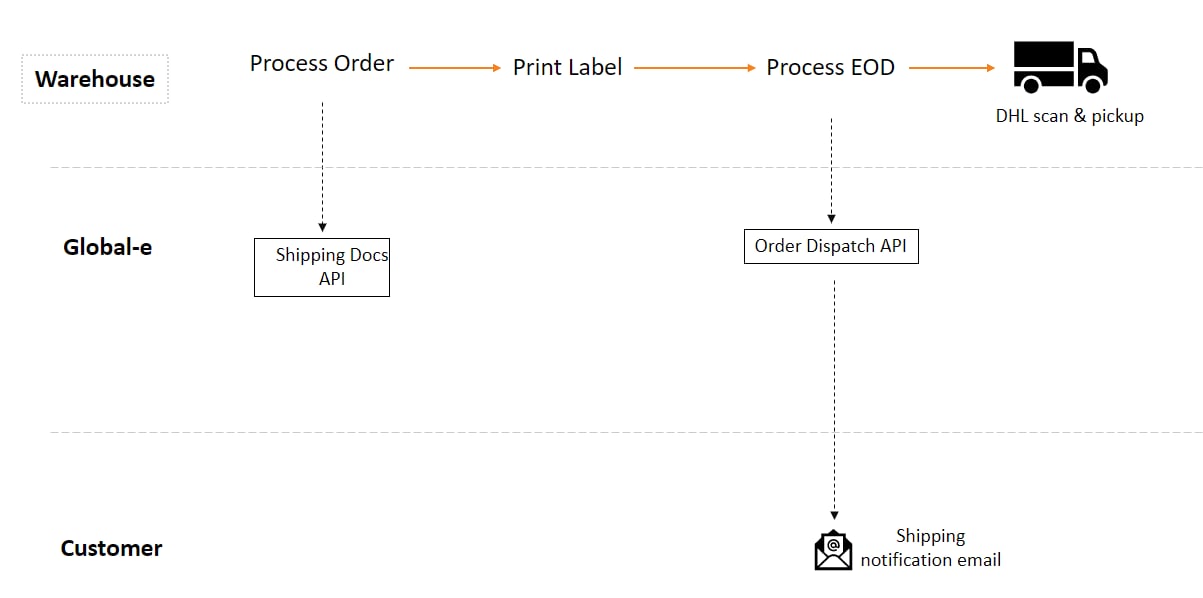
Ensuring an accurate description of the shipment contents on both the label and Commercial Invoice (CI) is crucial to avoid potential overcharges for duties and taxes. The information declared in the API must align with the actual contents of the parcels being shipped. The shipping process and its integration are built based on the following logic:- Receive and identify Global‑e operated orders.
- Declare orders fulfilled and ready for dispatch in API call #1.
-
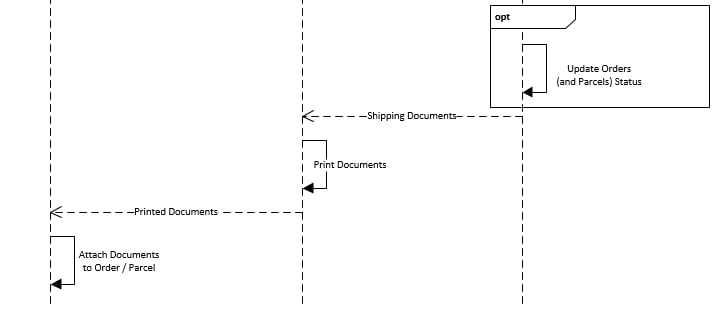
Retrieve shipping documents as a response to API call #1.
- The carrier label
- The commercial invoice (for non-paperless countries)
- Other documents, such as the Dangerous Goods note
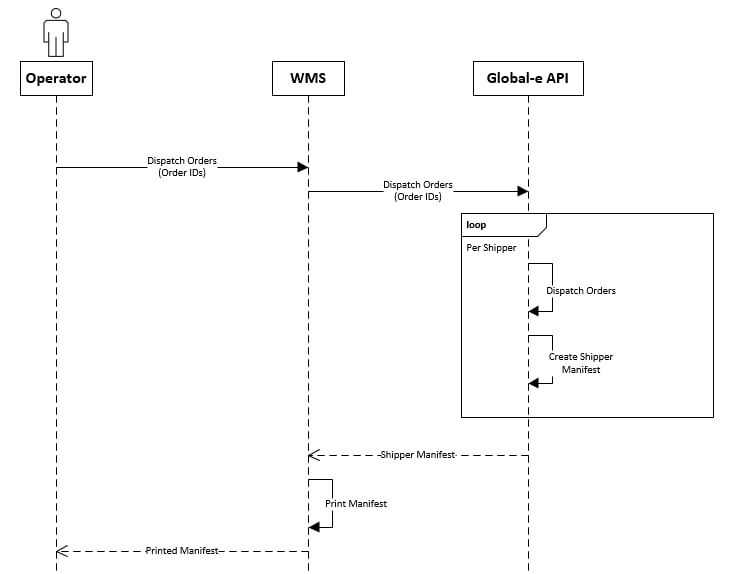
- Declare effective dispatch of orders in API call #2.
- Retrieve the carrier manifest for carrier sign-off as a response to API call #2.
- Declare the fulfilment back to the eCommerce platform.
Declare Order Fulfilment and Retrieve Shipping Documents
Orders Dispatch Notification
Prerequisites
The Merchant Order Management System (OMS) or Warehouse Management System (WMS) should be familiar with and support the following features, either directly or through an escalation process:- Display the complete list of items in the order
- Enable the selection of items for dispatch
Integration Steps
Identify Orders Processed via the Global‑e API
You can receive orders directly on your eCommerce platform or via 3rd party integrations. Accordingly, the following scenarios should be supported to associate orders with the Global‑e integration to generate shipping documentation:-
Shipping/Carrier code as provided in the order payload received
In Shopify’s context, such indication is available via the order
shipping_linescode or title field. Mapping of values presented in these fields should allow mapping orders to the Global‑e integration. Outside Shopify, standard carrier mapping as currently performed should be used. -
Additionally when using a direct integration with Shopify to retrieve orders, for example, Managed Markets, the merchant_of_record_app_id field will be provided. When Global‑e is responsible for an order, this value will be set to 2745565185. However, if you are an independent merchant doing this integration, you may choose either of the methods above per your integration.
The
merchant_of_record_app_idfield is available on Shopify webhooks, RESTful GET Orders calls or GraphQL queries. Version 2022-10 or later of the Shopify API is required for this field to be present.
Declare Order Fulfilment and Get Documents
GetShippingDocuments
From the orders indicated as fulfilled with possible exceptions, the Global‑e API will return the required shipping documentation as a base64 encoded byte array and URL for printing
Method/URL
Response Parameters:
Example Request POST Request
UpdateOrderDispatchRequest
OrderDocumentsResponse with List<OrderDocument> Documents
-
General API error as
ErrorInfo: -
Object processing error as
OrderDocumentsResponse:
- Shipper Name (order level)
- Tracking Number (for each parcel and order level)
- Tracking URL (for each parcel and order level)
ParcelsTracking array by matching the relevant parcel code tracking.
If the tracking is done on the order level, the tracking information of the order (Tracking Number and URL) will be populated on the parcel level as well (with the same values).
OrderDocument DocumentTypeCode list
UseDocumentTypeCode to identify the type of document returned by the API and how to print it.
Labels for Zebra/Thermal Printer
A4 / Letter Size for Laser printer
Notify Order Dispatch and Retrieve Carrier Manifest
DispatchOrders
The DispatchOrders API provides the necessary carrier manifest, encoded as a base64 byte array, and a printing URL for all orders with printed labels since the last DispatchOrders call. Non-Shopify orders are tagged as Dispatched to Customer and set up to send tracking notification emails.
Method/URL
EXAMPLES
Request
OrderDocumentsResponse
Response
Mark the Order Fulfilled
Once a label has been used to ship a set of goods, update the fulfilment state back to the merchant platform to complete the workflow.- Status: Success
- Tracking Company: Use the
ShipperNamereturned by theGetShippingDocumentscall - Tracking Number: Use the
ParcelTrackingNumberreturned by theGetShippingDocumentscall - Items: Only those items that have shipped with this label should be identified
Use Cases
Examples of request body as UpdateOrderDispatchRequest Order description for this section :- product-A in quantity 1
- product-B in quantity 2
Single Parcel Shipping
Single callMulti Parcel
Single callSplit Parcels
First call (“day 1”)Country Of Origin, Parcel Weight & Dimensions
You can send the product’s country of origin, parcel weight, and parcel dimensions to DHL and Aramex via the ship request, according to the data you provided via GetShippingDocuments. If any of the following attributes are not specified, this information is taken from the default value provided in the product catalogue, as part of the ecommerce integration :- Product Country of Origin
-
Parcel Weight: For Global‑e Enterprise, the weight of the products within the parcel is calculated according to the parcel weight with the simple average method.
Example: For a parcel weighing 1000 Grams with two items, each item will weigh 500 Grams.
The weight is always in Grams in
GetShippingDocuments. -
Parcel Dimensions: For Aramex, Global-e provides the parcel dimensions according to the first parcel even for consolidated shipment (in the current implementation, the dimensions exist at the shipment level and not per parcel).
The dimensions are always in Centimetres in
GetShippingDocuments.
Error Handling
Processing Exception Scenarios
Normal Operation – No issues
With Error Handling
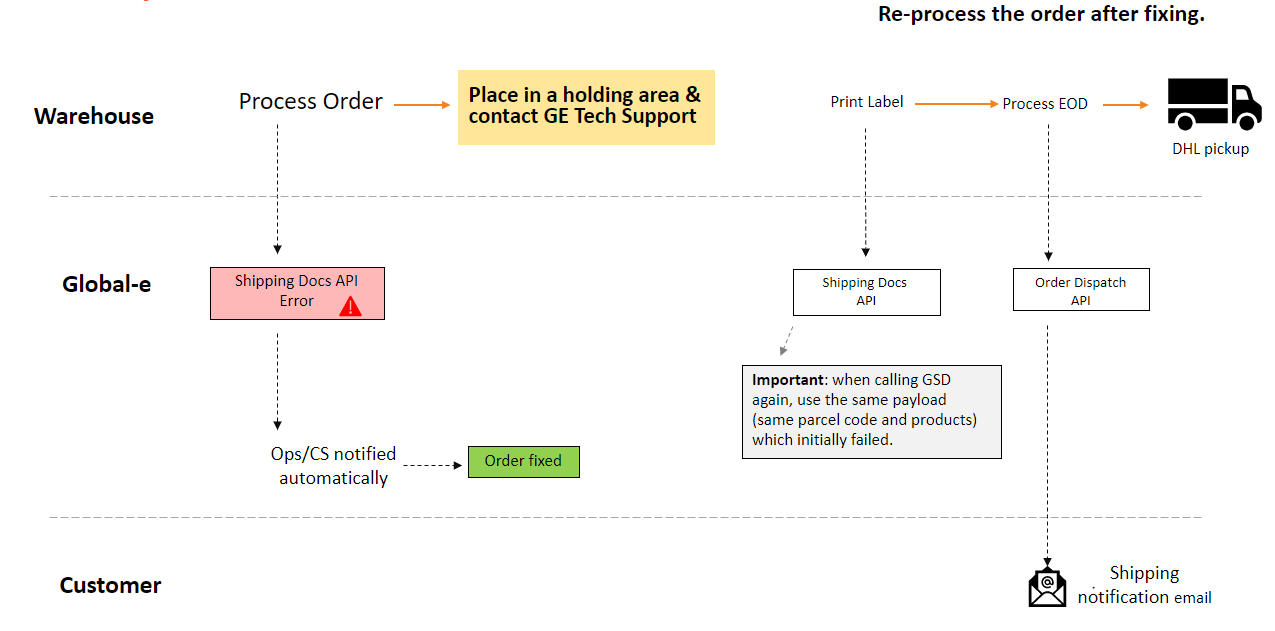
Scenario: Order to be Cancelled after a Failed API request
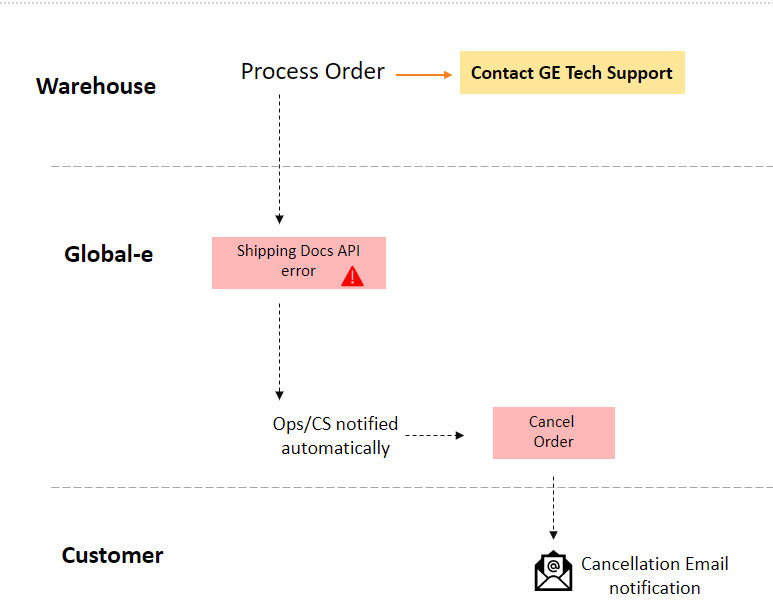
Scenario: End-of-day Manifesting
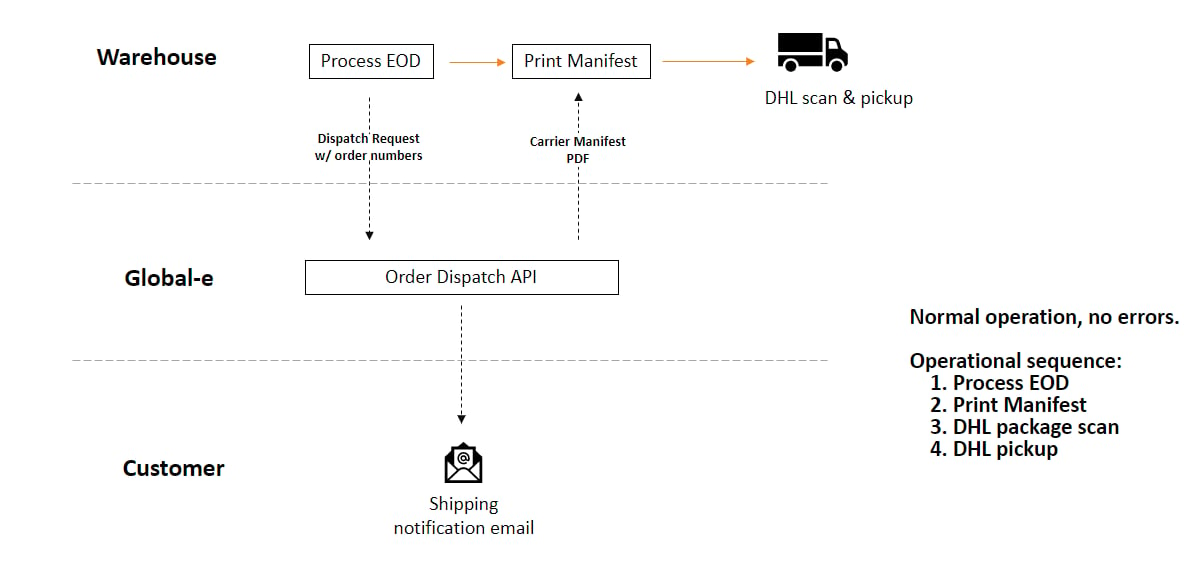
Scenario: End-of-day Manifesting with Possible Errors
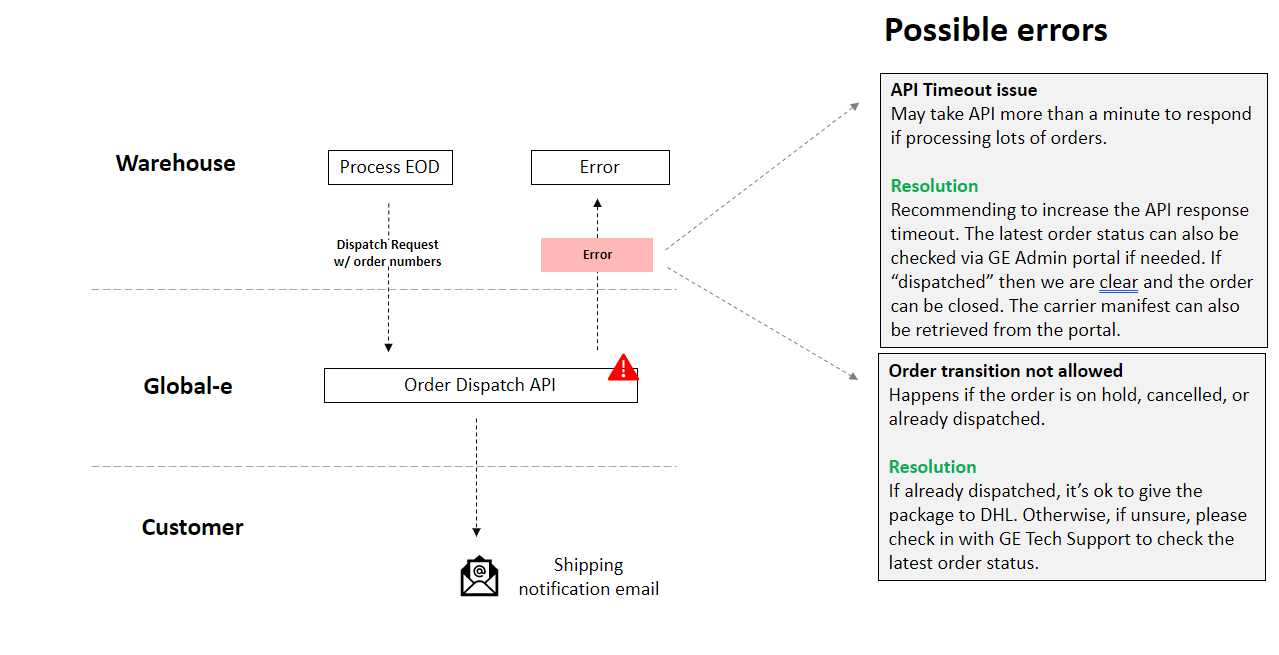
Scenario: End-of-day Manifesting with Possible Errors and Error Handling
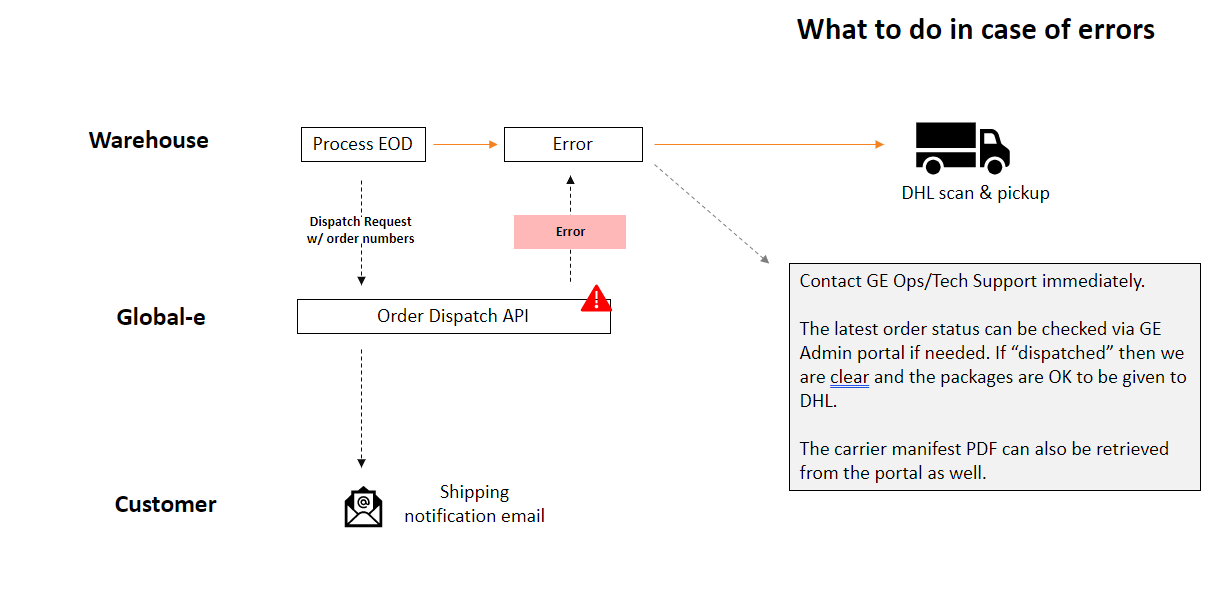
GetShippingDocuments Error Codes
DispatchOrders Error Codes
Void Parcel
Introduction
The Void Parcel API lets you take out a declared parcel if you do not intend to send it or if it needs to be updated due to changed shipment requirements. Note: At least one order ID should be provided in the request, Global-eOrderId or the merchant’s MerchantOrderId.
Integration Overview
Method/URL- string
OrderId(mandatory) - Order unique identifier - string
ParcelCode(mandatory) - Code used to identify theParcelCodeto void. - string
MerchantOrderId- The merchant’s order unique identifier.